Business Management Pixel Perfect Icons: Visual Clarity for Modern Professionals
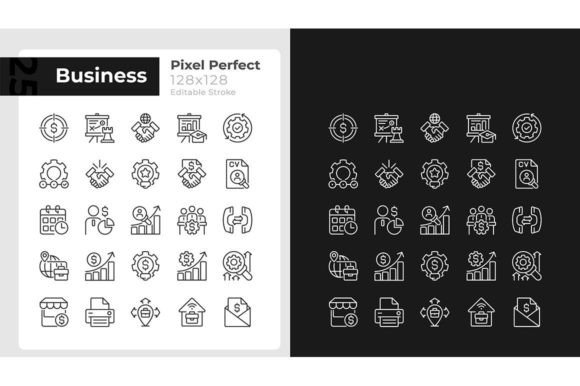
Business Management Pixel Perfect Icons bring a new level of precision to visual communication in corporate and entrepreneurial contexts. Whether you are preparing a board presentation, designing a mobile dashboard, or building a brand toolkit, these icons offer consistency across light and dark interfaces. The set includes 25 linear editable stroke icons for light mode and 25 dark editable stroke icons for night mode, all crafted to maintain crispness at any size. This article explores what makes these icons valuable, how they can be applied in real projects, and what you should consider before integrating them into your workflow.
Why Pixel Perfect Icons Matter in Business Management
Icons are not merely decorative; they carry meaning. In business management contexts, where dashboards, reports, and planning tools are used daily, clarity is paramount. Business Management Pixel Perfect Icons are designed with an editable stroke that remains sharp on retina displays, standard monitors, and mobile screens alike. The thin line style aligns with modern minimalist design trends, helping professionals avoid visual clutter while maintaining a polished look.
These icons support both dark and light modes, a feature increasingly demanded by users who switch between day and night themes. The set includes isolated illustrations that can be placed on any background without blending issues. For business owners and creators who work across different platforms, this adaptability saves time and preserves brand consistency.
Understanding the Icon Set: Formats, Fonts, and Flexibility
The product file formats include EPS, SVG, PNG, JPEG, and AI, covering nearly every common use case. SVG files are ideal for web and app interfaces because they scale without loss. EPS and AI files suit vector editing in Adobe Illustrator or similar tools, while PNG and JPEG provide ready-to-use raster options for quick placements.
The icons use Montserrat Bold and Montserrat Light fonts, which are free and widely available. This typography choice adds a clean, professional feel to any caption or label accompanying the icons. The set is created by BSD Studio, a provider known for icons, brochure infographic templates, mobile app screen pages, and more. New topics and discounts are offered every week, and subscribing to BSD Studio keeps you updated on fresh releases.
Real-World Applications for Business Owners and Creators
Imagine you are a small business owner preparing a quarterly review deck. Using Business Management Pixel Perfect Icons, you can represent revenue growth, team performance, and operational workflows with consistent icons that match your brand's color palette. Since the stroke is editable, you can adjust line thickness or change colors to fit your presentation theme.
For UX designers building a mobile app for task management, the dark mode icons ensure that users navigating at night see clearly without eye strain. The light mode set works perfectly for daytime interfaces. This dual-mode capability is especially valuable for productivity apps, where users often toggle between themes.
Freelancers and creators who produce infographics or social media content will appreciate the isolated illustrations. You can drop an icon onto any background—white, dark, or colorful—and it integrates seamlessly. The thin line style also pairs well with modern sans-serif typography, creating a cohesive visual language across your materials.
Strengths of the Business Management Pixel Perfect Icons Set
- Editable stroke: Adjust line weight, color, and style without losing quality. This is essential for matching brand guidelines.
- Dual-mode readiness: 25 icons for light mode and 25 for dark mode eliminate the need to create separate sets for different themes.
- Multiple file formats: EPS, SVG, PNG, JPEG, and AI cover vector and raster needs for print, web, and mobile.
- Free fonts used: Montserrat Bold and Light are accessible to everyone without licensing concerns.
- Scalable and crisp: Pixel perfect design ensures sharpness at any size, from small mobile icons to large presentation graphics.
Considerations and Limitations
While Business Management Pixel Perfect Icons offer strong value, it is realistic to note a few considerations. The set includes 25 icons per theme, which may not cover every niche business concept you need. For example, industry-specific terms like "supply chain analytics" or "HR compliance" might require supplementary icons. However, the editable stroke allows you to customize the existing icons to represent broader ideas.
Another point is that the thin line style, while elegant, may appear too delicate at very small sizes on low-resolution screens. Testing the icons at your target dimensions is advisable. Most modern devices handle thin lines well, but older monitors or projectors might not render them as clearly.
Additionally, the set is provided as isolated illustrations without pre-built layouts. You will need to integrate them into your own design software or platform. For users comfortable with vector editing, this is a benefit; for those seeking plug-and-play solutions, it may require a slight learning curve.
Who Benefits Most from This Icon Set
This product suits a wide audience, but certain groups will find it especially useful:
- Business professionals who prepare presentations, reports, and internal communications and need consistent visuals.
- UX/UI designers building apps or websites that support dark and light modes and require scalable vector icons.
- Graphic designers and marketers creating infographics, brochures, or social media assets for business clients.
- Entrepreneurs and startups establishing a brand identity with limited resources, who can use these icons as a foundation.
- Educators and trainers developing course materials or e-learning modules that need clear, professional icons.
Practical Expectations When Using These Icons
When you download Business Management Pixel Perfect Icons, you receive files that are ready to import into your design environment. The EPS and AI files open natively in Adobe Illustrator, while SVG files can be dropped into Figma, Sketch, or any web project. PNG and JPEG versions work directly in PowerPoint, Keynote, or Canva.
If you plan to use the icons in a mobile app, SVG is the recommended format because it scales across screen sizes without quality loss. For printed materials such as brochures or posters, EPS or AI provide the highest resolution. The PNG format with transparent background is convenient for quick web use.
Because the fonts used are Montserrat Bold and Light, any text you pair with the icons will share a consistent typographic voice. This is subtle but important for cohesive design. The fonts are free and can be downloaded from Google Fonts if you do not already have them installed.
How to Evaluate Whether This Set Fits Your Project
Before purchasing or downloading any icon set, consider your specific needs. Start by listing the concepts you need to represent. If your project revolves around core business management topics—such as strategy, finance, operations, team management, and growth—this set likely covers the essentials. If you require highly specialized icons, you may need to supplement with additional sets or custom creations.
Next, consider the visual style. The thin line, pixel perfect aesthetic suits modern, clean designs. If your brand uses thick outlines or detailed illustrations, this set may feel out of place. However, because the stroke is editable, you can thicken the lines if needed, which adds some flexibility.
Finally, evaluate your workflow. If you routinely work with vector software, the file formats will integrate seamlessly. If you prefer drag-and-drop tools, the PNG versions offer immediate usability. The dual-mode capability is a strong advantage for anyone designing for both light and dark environments.
Staying Updated with BSD Studio
BSD Studio regularly releases new icons, brochure infographic templates, mobile app screen pages, and more. By subscribing, you receive updates on fresh topics and discounts every week. This is particularly useful if you build multiple projects over time and want consistent design elements. Subscribe to BSD Studio to stay informed about upcoming releases and promotional offers.
Final Thoughts
Business Management Pixel Perfect Icons deliver practical value for professionals who need clear, adaptable visuals. The dual-mode light and dark sets, editable stroke, multiple file formats, and use of free Montserrat fonts make them a versatile tool in any designer's or business owner's arsenal. While the set may not cover every niche concept, its flexibility and precision compensate for that limitation in most common scenarios. Whether you are preparing a boardroom presentation, designing a productivity app, or building a brand kit, these icons offer a solid foundation for visual communication.