Prebiz Digital Business Website Template: Building a Professional Online Presence with Efficiency and Flexibility
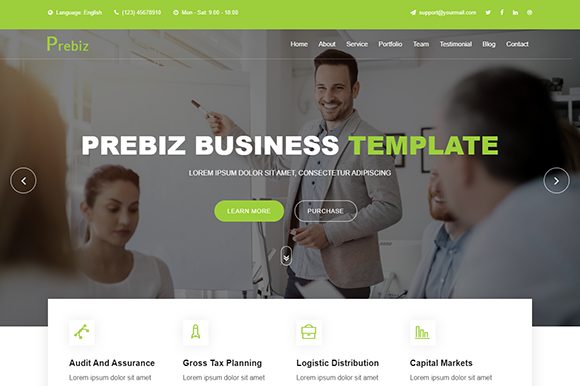
When you set out to create a corporate website, the gap between vision and launch can be filled with redundant design decisions, compatibility checks, and endless CSS tweaks. The Prebiz Digital Business Website Template is built to close that gap. It is a Bootstrap-based, creative HTML5 template specifically designed for consulting firms, corporate brands, and any service-oriented business that values polished presentation without wasted development hours. By offering a complete set of HTML, CSS, JS, and PHP files, Prebiz gives you a production-ready skeleton that you can adapt to your brand, content, and workflow.
Where Prebiz Fits Into Your Web Development Workflow
Every website project follows a cycle: planning, design, development, testing, launch, and maintenance. Prebiz becomes relevant from the very first phase. Instead of starting with a blank page or assembling components from multiple libraries, you begin with a template that has already resolved many design and code dependencies. This means you spend less time on boilerplate styling and more on content strategy, user experience, and business logic.
During the planning stage, you can review Prebiz’s included pages—home, about, services, portfolio, blog, contact—and map your content to the existing layout. The template’s clean structure and detailed documentation allow you to estimate effort realistically. You know exactly which files to modify: HTML for content, CSS for brand colors, and JS for interactive elements. This transparency makes the template a solid reference for project timelines and resource allocation.
In the development phase, Prebiz accelerates implementation. Its responsive grid, built on Bootstrap, ensures your site looks consistent across desktop, tablet, and mobile without extra media query work. The template includes Font Awesome icons and Google Fonts, so you can avoid licensing or performance overhead from third-party icon sets. The pre-built animations (CSS3 and JQuery) add polish with minimal effort—just apply the appropriate classes to elements you want to fade, slide, or scale on scroll.
After launch, the maintenance phase benefits from Prebiz’s commented code. If you later need to update a footer link, add a new service page, or swap out animation libraries, the well-organized file structure reduces the risk of breaking other parts of the site. The working PHP contact form is a practical asset: it handles submissions out of the box, so you don’t have to build form processing from scratch or rely on third-party services for basic inquiries.
Real-World Workflow Example: Launching a Consulting Firm Website
Consider a small management consulting practice launching its online presence. The team has three weeks until a major industry conference where they plan to showcase their expertise. Using Prebiz, they can:
- Week 1: Set up the core pages. They replace demo text with their case studies, adjust the primary color via CSS variables, and add team photos. They use the portfolio section to display project highlights, trusting that the existing grid and hover effects communicate professionalism.
- Week 2: Integrate analytics, a company blog, and social media links. Because Prebiz has clean semantic markup, adding tracking scripts is straightforward. The blog page layout already includes list and single post views, so they just populate content.
- Week 3: Test the contact form on multiple devices, review responsiveness, and finalize the SSL certificate. The template's pixel-perfect design holds up, and the 24/7 friendly customer support resolves one CSS override question quickly. They launch with confidence.
The template didn't just save design time; it provided a consistent framework that allowed non-developers on the team (like a marketing manager) to update content directly in the HTML files without fear of breaking layout.
Integration with Other Tools, Resources, and Methods
Prebiz does not exist in isolation. Its Bootstrap foundation means it integrates seamlessly with most front-end workflows. If you use build tools like Gulp or Webpack, you can place Prebiz’s CSS and JS files into your asset pipeline. The template’s reliance on standard HTML5 and CSS3 ensures compatibility with modern CMS platforms; you can extract the design and embed it into WordPress, Joomla, or a static site generator like Jekyll or Hugo.
The included PHP contact form can be extended to connect with CRM services. For example, you can modify the form handler to push submissions to HubSpot, Salesforce, or a simple email forwarder. This bridges the gap between your website and your sales process, creating a seamless lead capture workflow.
From a content management perspective, Prebiz is a strong candidate for teams that prefer Git-based version control. Since the template is a static HTML site, you can commit changes, maintain branches for different marketing campaigns (e.g., a landing page variant for a product launch), and roll back if needed. This approach gives you the reliability of static sites with the visual sophistication of a modern template.
If you work with designers who use Sketch or Figma, you can use Prebiz as a reference to ensure pixel-fidelity. The template’s pixel-perfect alignment carries over from its design layer; you can inspect elements and match margins, padding, and font sizes exactly. This is especially useful when you need to hand off specific page templates to a developer for custom integration.
Practical Implementation Tips for Smooth Adoption
To get the most out of Prebiz, invest time in the preparation phase before you start coding. Read the detailed documentation that comes with the template. It explains the file structure, the animation classes, and the dependencies (like Bootstrap and JQuery versions). Knowing these details prevents conflicts later—for example, if you plan to add a third-party slider plugin, you can check that it doesn’t use a different JQuery version than the one Prebiz ships.
When customizing the template, keep these points in mind:
- CSS organization: Prebiz uses a single main stylesheet with clear sections. Add your custom overrides at the bottom so you can easily spot changes during future updates. If you link a new stylesheet after the template’s CSS, your rules take precedence without editing the original file.
- Asset replacement: Remember that images included in the download are for demo purposes only. Replace them with your own optimized images. Use the same file names or update the HTML src attributes. Prebiz’s image paths are logical, so batch replacement via find-and-replace is efficient.
- Animation usage: The template includes multiple CSS and JQuery animations. Use them deliberately. For a corporate site, subtle fades and slides are more appropriate than flashy bounces. Overusing animation can distract from content and slow perceived load time.
- Responsive testing: Even though Prebiz is fully responsive, test each page on actual devices—especially the contact form, navigation menus, and any custom modals. Bootstrap’s breakpoints handle most scenarios, but your specific content (like long headlines) may need minor adjustments.
Ensuring Quality Control and Consistency
Prebiz’s valid HTML markup and clean design reduce the risk of browser-specific bugs. Still, include a quality check step in your workflow. Validate your modified pages using the W3C validator; the template’s base code passes easily, so your changes should be the only potential source of errors. Use browser developer tools to inspect responsiveness and interactivity.
For consistency, establish a naming convention for custom classes. The template’s CSS follows a logical structure, so mirror that in your additions. If Prebiz uses .about-content for layout, avoid creating .about-text that duplicates styles—instead, reuse existing classes or extend them. This practice keeps your codebase lean and easier for another developer to understand.
The commented code in Prebiz is a hidden efficiency gain. When you revisit the site six months later to add a testimonial slider or update the team section, the comments remind you of the component structure. You don’t have to reverse-engineer the layout. This self-documenting property is invaluable for agencies that hand off projects or for businesses where multiple people maintain the site.
Long-Term Maintenance and Scalability
Prebiz is built for durability. The use of standard HTML5 and CSS3 means your site won’t become obsolete quickly. Bootstrap, Font Awesome, and Google Fonts have long-term support. If you need to migrate to a new hosting environment or change domain, the static nature of the template makes transfer simple—just copy the files.
Scaling the site involves adding new pages that follow the same HTML structure. You can duplicate an existing page, rename it, update the navigation menu, and link to it. The consistent design language ensures that new pages feel like part of the original site. If your business evolves and you need a different layout (e.g., a landing page for a new service), you can lean on Prebiz’s existing components rather than rebuilding from scratch.
The 24/7 friendly customer support is a practical resource. If you encounter a bug or need guidance during a tight deadline, you can reach out instead of troubleshooting blindly. This support reduces downtime and helps you maintain momentum in your project workflow.
The files included—HTML, CSS, JS, fonts, and the PHP contact form—cover every technical layer a small to mid-size corporate site needs. No hidden dependencies, no premium plugins required. This completeness makes it a reliable foundation for a long-term digital presence.
In summary, the Prebiz Digital Business Website Template is more than a set of pages; it is a workflow accelerator. It fits before your project planning, during your development sprints, and after launch as a maintainable asset. By treating it as a starting point rather than a finished product, you gain a template that respects your design vision while streamlining the execution. Whether you are a freelancer building a client site, an entrepreneur showcasing your own consulting practice, or a marketer managing multiple corporate pages, Prebiz gives you the structure to work smarter and launch with confidence.