Evaluating the Premium Font Bundle: A Practical Overview
Typography plays a foundational role in design, influencing readability, tone, and overall visual impact. For designers, content creators, and small business owners, building a versatile font library often involves balancing cost against variety and quality. The Premium Font Bundle—a collection of 20 fonts priced at $5—presents itself as a cost-effective option for those seeking a range of typefaces. This article examines the bundle's composition, its potential benefits and limitations, and the scenarios where it may or may not align with your design needs.
Understanding What the Premium Font Bundle Includes
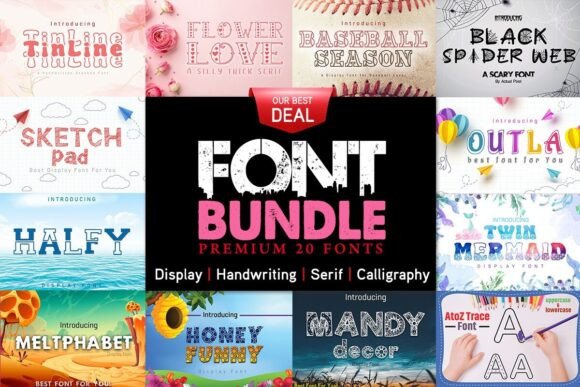
The Premium Font Bundle offers 20 individual fonts spanning several common categories: script, serif, sans-serif, display, and variable fonts. Each font is provided in both OTF (OpenType) and TTF (TrueType) formats, which ensures compatibility across most operating systems and design software. The bundle is marketed at a single price point of $5, with the stated savings of $229 relative to purchasing each font separately at full retail.
This type of aggregated offering is common in the font marketplace, where bundles allow buyers to acquire multiple typefaces for a fraction of their standalone cost. The inclusion of variable fonts is worth noting, as this format allows for adjustable weight, width, or other attributes within a single font file, offering flexibility that traditional static fonts do not.
Reasons to Consider the Premium Font Bundle
For many designers and non-designers alike, the primary draw of a font bundle is cost efficiency. At $5 for 20 fonts, the per-font cost is minimal. This can be particularly appealing for those who need a broad selection of typefaces for clients, projects, or personal use but do not have a large budget for typography.
The variety across styles—script, serif, sans-serif, and display—means the bundle can cover multiple use cases: body text, headlines, logos, invitations, website headers, and more. The presence of variable fonts adds a modern touch, allowing for refined control over typographic expression without needing multiple individual font files.
Another practical consideration is the dual-format delivery. OTF and TTF are the most widely supported font formats in both design software and operating systems. This reduces compatibility concerns and makes the fonts usable across platforms like Windows, macOS, and major design applications such as Adobe Creative Suite, Figma, or Canva.
Potential Benefits in Practice
- Budget-friendly entry point: For freelancers, students, or hobbyists, $5 is a low-risk investment to expand a font library.
- Style diversity: Having access to multiple typeface categories means fewer gaps in project-specific needs, from formal serif text to decorative display lettering.
- Modern variable font support: Variable fonts can streamline workflows by offering multiple weights and styles from a single file, which can improve performance in web projects and simplify file management.
- Broad compatibility: OTF and TTF formats ensure the fonts work in most environments without requiring conversion or special software.
Tradeoffs and Considerations
While the Premium Font Bundle offers clear advantages in terms of cost and variety, there are tradeoffs that merit attention. One of the most significant is the origin and quality of the fonts. Bundles at very low price points sometimes include typefaces from sources where design quality, kerning, hinting, and character set completeness may vary. Not all fonts in a bundle undergo the same rigorous quality assurance as premium, individually sold typefaces from established foundries.
Character support is another factor. Some budget bundles offer limited language coverage, which may not include accented characters or glyphs needed for non-English text. If your projects require multilingual support, this is an important detail to verify before purchasing.
Licensing terms also vary widely. While the bundle is marketed as a personal or commercial use product, the exact license agreement dictates how the fonts can be used—whether for client work, web embedding, app development, or printed materials. It is essential to review the end-user license agreement (EULA) to ensure the fonts can be deployed as intended.
Additionally, the sheer number of fonts in a bundle does not guarantee that every typeface will be useful. A 20-font collection may include several fonts that are similar in style or that do not align with your typical design work. The value of the bundle depends heavily on how many of the fonts you actually integrate into your workflow.
Potential Drawbacks to Keep in Mind
- Variable quality control: Fonts in low-cost bundles may lack the polish of premium foundry offerings.
- Limited character sets: Language support beyond basic Latin may be sparse.
- License restrictions: Usage rights can be more restrictive than expected; always read the fine print.
- Redundancy: You may end up with several fonts you never use, reducing the effective value per font.
- Lack of customer support or updates: Bundles from smaller distributors may not offer ongoing support or future updates.
Scenarios Where the Premium Font Bundle Is a Strong Fit
This bundle is well-suited for situations where budget constraints are a primary concern and where the need for variety outweighs the need for specialized, high-end typography. For example, a freelance graphic designer just starting out may benefit from having a range of styles to test in client mockups without committing to expensive individual licenses.
Small business owners who handle their own marketing materials—such as social media graphics, flyers, or simple websites—may find the bundle sufficient for establishing a consistent visual identity without overspending. The inclusion of variable fonts also makes the bundle attractive for web designers who want to experiment with responsive typography.
Students and educators in design programs can use the bundle as a learning tool to explore different type categories and understand how variable fonts function in practice. The low cost allows for experimentation without financial risk.
Situations Where Alternatives May Be Worth Considering
If your work demands professional-grade typography with meticulous kerning, extensive glyph coverage, and proven cross-platform performance, a premium font from an established foundry is likely a better choice. Brands with strict identity guidelines often require typefaces with a clear provenance and predictable rendering across media.
For large organizations or agencies that produce high-volume printed materials, licensing terms become critical. Some budget bundles prohibit embedding in apps or limit the number of users or projects. In such cases, investing in a single high-quality font with a comprehensive license may be more practical and cost-effective over time.
If you need specific niche styles—such as a particular historical serif, a highly expressive script, or an ultra-light sans-serif for editorial use—the bundle may not offer the depth or precision you require. Curated subscription services like Adobe Fonts or foundry-specific libraries (e.g., Monotype, Hoefler&Co., FontFont) provide access to professionally crafted typefaces with clear licensing and support.
Another alternative is to use free and open-source fonts from reputable sources such as Google Fonts or SIL International. These options offer strong quality and broad language support at no cost, though they may lack the exclusive or distinctive character of commercial fonts.
Practical Decision-Making Insights
When evaluating whether the Premium Font Bundle meets your needs, consider the following practical steps:
- Audit your current font library: Identify gaps in your collection. If you lack a script font for a specific project or need more display options, the bundle may fill those gaps efficiently.
- Review sample glyphs and character sets: Look for samples that show punctuation, numerals, and accented characters. This helps gauge whether the fonts will serve your actual text content.
- Examine the license agreement: Confirm that the license covers your intended use—commercial work, web use, app embedding, or client deliverables. If the terms are unclear, contact the seller.
- Test before committing to major projects: Download and install the fonts, then test them in your design environment. Evaluate legibility at small sizes, readability in body text, and visual impact in headlines.
- Compare with free alternatives: Before purchasing, browse Google Fonts or other free libraries to see if similar styles are available at no cost. If the bundle offers unique styles or variable fonts not found in free collections, it may be worth the price.
- Consider the total cost of alternatives: A single premium font can cost $30–$100 or more. If you need multiple styles and the bundle provides usable quality, the savings are substantial. However, if you only need one or two fonts, individual purchase may be more economical.
Aligning the Bundle with Your Goals
Ultimately, the Premium Font Bundle serves a specific niche: it is a low-cost, multi-style collection that offers breadth over depth. For designers and content creators who value variety and are working within a tight budget, it can be a practical addition to a font library. The dual-format delivery, inclusion of variable fonts, and range of style categories make it a versatile resource for general-purpose design work.
On the other hand, if your projects demand professional-grade quality, extensive language support, or highly specialized typefaces, the bundle may fall short. In those cases, investing in individual fonts from reputable foundries or using curated subscription services will provide greater reliability and peace of mind.
By assessing your specific use cases, reviewing the fonts' quality and license terms, and comparing the bundle against free and paid alternatives, you can make an informed decision that aligns with both your creative goals and your budget. The Premium Font Bundle is not a universal solution, but for many users, it represents a sensible starting point for building a more diverse typographic toolkit.