Tennis Sport Match Instagram Story: Engage Your Audience
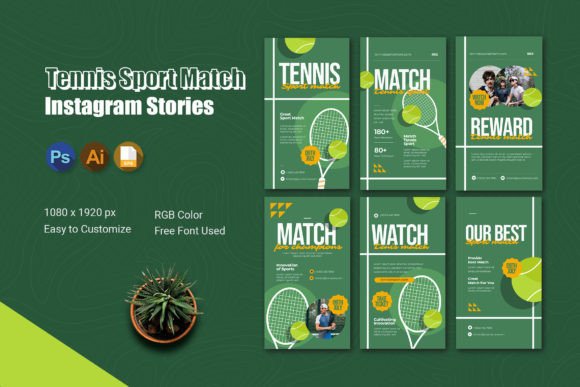
Sharing tennis match moments on Instagram can feel like a challenge when you are short on time or design skills. The Tennis Sport Match Instagram Story template simplifies this process. It is a pre-designed set of six story pages that help you present match highlights, player updates, and fan interactions in a cohesive, professional style.
Instead of starting from scratch, you drop your own photos, videos, and text into ready-made layouts. The result is a polished story sequence that feels energetic and personal. Whether you run a tennis club, coach beginners, or simply love the sport, this template lets you share your moments quickly without sacrificing quality.
What Makes This Instagram Story Template Different
Many story templates focus on generic aesthetics, but this one is built specifically for tennis content. The layouts include space for action shots of serves and volleys, scoreboards, player spotlights, and interactive elements like polls and question stickers. The design follows a 1080x1920 pixel portrait format, so every element fits perfectly on mobile screens.
The package comes with AI, PSD, and EPS files, meaning you can edit the template in Adobe Illustrator, Photoshop, or other compatible software. Colors, fonts, and mockups are fully customizable. You are not locked into a specific look. If your brand uses a certain green or blue, you can adjust the palette accordingly. The free fonts are included, and a help file guides you through the editing steps.
Why You Might Want to Use a Tennis‑Specific Story Template
Creating visual content for sports requires speed and relevance. Matches happen fast, and your audience wants updates while the excitement is fresh. A dedicated tennis story template helps you meet that need without scrambling for design ideas.
If you are a tennis coach, you could share a short clip of a student’s improved backhand, then use a poll to ask followers which stroke they want to see next. For a club owner, the template lets you promote upcoming tournaments, share behind‑the‑scenes footage of court maintenance, or celebrate member achievements. Even casual players who post match recaps for friends will find the structure saves time and makes their stories look more engaging.
The template is also valuable for marketers and entrepreneurs who run tennis‑related businesses. Whether you sell equipment, organize events, or manage a tennis apparel brand, consistent story design builds recognition. Followers start to associate your polished look with reliability and passion for the sport.
Match Day Highlights
Imagine you have just finished a local tournament. You have a handful of photos showing a powerful serve, a close call at the net, and the final handshake. With this template, you can place each photo on a dedicated page. Add a short text overlay describing the moment, and use the built‑in sticker areas to share the final score. The sequence tells a story from start to finish, making viewers feel like they experienced the match with you.
Player Spotlights and Introductions
If you run a tennis academy, use the template to introduce a player of the week. One page can hold a portrait photo, another can display their stats or personal goals. A question sticker such as “Which shot do you want to learn from them?” encourages followers to engage directly. This approach works for both junior and adult players, and it helps build a sense of community around your brand.
Interactive Training Tips
Coaches can use the template to share quick tips. For example, a page could show a video loop of a proper grip, followed by a poll asking “Do you use an eastern or semi‑western grip?” The next page might break down the answer with a simple diagram or bullet list. The interactive features turn passive viewers into active participants, which increases story completion rates.
Event Promotion
Planning a doubles tournament or a charity match? The template lets you create a countdown series. Use one page for the date and location, another for registration details, and a third for prize information. Because you can change colors and mockups, the story feels on‑brand rather than like a generic announcement.
What to Consider Before You Start Customizing
The template is designed for easy editing, but there are a few things to keep in mind.
- Software access: You will need Adobe Illustrator, Photoshop, or another program that can open AI, PSD, or EPS files. If you only have basic photo editors, check compatibility first.
- Font installation: Free fonts are included in the package, but you must install them on your computer before opening the template. The help file explains how to do this.
- Preview photos: The template comes with placeholder images. These are not included for commercial use, so you must replace them with your own photos or licensed stock images.
- Story length: While the template offers six pages, you can use all or only some. Instagram Stories work best when concise, so choose your strongest visuals and trim any repetitive content.
- File organization: Keep the AI, PSD, and EPS files in a dedicated folder along with the installed fonts. This prevents missing links when you reopen the project later.
How to Get the Most Out of the Interactive Features
Stories thrive on engagement. The template includes areas where you can add polls, questions, and sliders. Use these intentionally.
For example, after showing a match highlight video, add a poll that asks “Who do you think won this point?” and see what your audience predicts. Or use the question sticker to invite followers to share their own tennis memories. This turns your story from a one‑way broadcast into a conversation. Even simple reactions, like a “Which surface do you prefer?” poll, encourage taps and responses, which signals the Instagram algorithm to show your stories to more people.
Interactive features also provide feedback. If you run a small tennis business, you can ask followers what content they want more of—training drills, gear reviews, or match updates. The answers help you plan future stories that actually matter to your audience.
For Bloggers and Content Creators
If you write about tennis technique or follow professional tours, the template helps you repurpose longer content into snackable stories. Take a key insight from your latest blog post and turn it into a three‑page story series. This drives traffic to your website while keeping your Instagram feed active.
For Freelancers and Educators
Tennis instructors who offer online lessons can use the template to share student progress. A before‑and‑after comparison of a serve motion becomes instantly clear when shown side by side in the template’s layout. The educator can then use a question sticker to clarify common mistakes, providing value that keeps followers coming back.
For Small Business Owners
If you sell tennis rackets, apparel, or accessories, the template works as a mini catalog. Feature a product on each page with a short benefit and a call‑to‑action like “Tap to shop.” You can also share customer reviews using the quote‑style layout, building trust without writing a long caption.
Editing Tips to Make the Template Feel Uniquely Yours
While the template provides a strong foundation, personal touches make it stand out.
- Adjust colors: Match the story palette to your club’s colors or your personal brand. The RGB color format ensures the shades appear vibrant on screens.
- Replace text thoughtfully: Keep captions short and action‑oriented. Instead of “Here is a photo of John playing,” try “John’s forehand winner that sealed the set.” Specific language invites viewers to see the moment through your eyes.
- Mix media types: Use a video clip for the first page to grab attention, then photos for the middle pages, and end with an interactive element like a poll. This variety holds interest across all six slides.
- Leverage empty space: The template includes clean areas around images. Do not feel forced to fill every corner. White space improves readability and focuses attention on your subject.
Why This Approach Matters for Your Content Strategy
Instagram Stories disappear after 24 hours, but their impact lasts. A well‑designed story series can boost message replies, profile visits, and even website clicks. The Tennis Sport Match Instagram Story template removes the friction of designing from scratch, so you can publish more consistently. Over time, your audience begins to recognize and anticipate your match‑day stories.
Consistency also builds authority. When you share polished stories that include scores, player insights, and interactive prompts, followers view you as a reliable source for tennis content. This is especially important for coaches and small business owners who compete for attention in a crowded space. A template helps you maintain professionalism without spending hours on layout decisions.
For casual users, the template simplifies the creative process. You do not need to study design principles or learn complex software. The included AI, PSD, and EPS files are structured with layers, so you can edit text, swap images, and adjust colors in minutes. The help file walks you through each step, reducing the learning curve.
Final Observations
The most effective Instagram Stories feel spontaneous yet intentional. The Tennis Sport Match Instagram Story template supports that balance by giving you a solid structure while leaving room for your personal flair. Whether you are sharing a weekend match with friends or promoting a club event, the six‑page sequence guides viewers through a narrative that keeps them watching until the end.
Remember that the preview photos are not included, so you will need your own high‑quality images. Take a few extra seconds to capture clear shots during matches—good source material makes the final story shine. Also, test your edits on a small group before posting to a wider audience. This helps you catch alignment issues or typo errors early.
Finally, do not be afraid to experiment. Swap the order of the pages, try different font sizes, or add your own stickers from Instagram’s library. The template is a starting point, not a rigid formula. As you become more comfortable with the editing process, you will develop a rhythm that feels natural and effective for your specific audience.