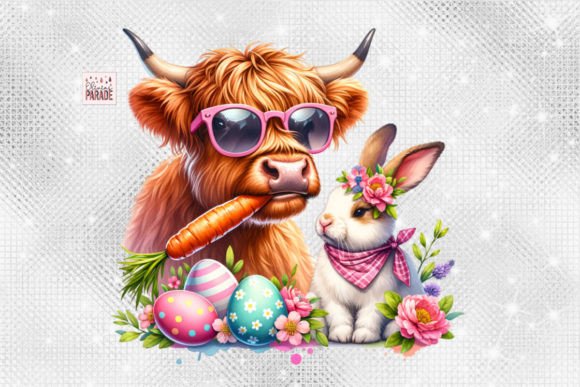
Easter Highland Cow PNG and Easter Bunny PNG: What Every Creator Needs to Know Before Using Them for Print on Demand
If you have come across Easter Highland Cow PNG and Easter Bunny PNG designs while looking for fresh seasonal artwork, you have likely noticed how quickly they can elevate a simple product into something customers actually want to buy. The combination of a rugged Highland cow with bunny ears, pastel eggs, or spring florals is unexpected, charming, and remarkably versatile. These digital designs are sold as high-resolution PNG files, often bundled in a zip folder for instant download, and are intended strictly for creating physical products or print-on-demand items. But using them well—and avoiding costly mistakes—requires more than just clicking download and hitting print.
Many creators jump into seasonal designs without thinking through resolution, placement, color matching, or licensing terms. The result can be wasted materials, blurry prints, refund requests, or even intellectual property disputes. This article walks you through the most common pitfalls, explains how they affect your results, and offers practical fixes so you can use Easter Highland Cow PNG and Easter Bunny PNG designs with confidence.
What Easter Highland Cow PNG and Easter Bunny PNG Designs Actually Are
These are digital image files—not fonts, not templates, and not editable vector files unless otherwise stated. A typical Easter Highland Cow PNG features a shaggy Highland cow wearing bunny ears, surrounded by Easter eggs, spring flowers, or pastel patterns. The Easter Bunny PNG version usually shows a classic or stylized rabbit with similar festive elements. Because they are PNGs, they include a transparent background, which makes them ideal for layering onto shirts, mugs, tote bags, wall art, and sweatshirts.
The key selling point is instant access. You pay, download the zip folder, unzip it, and the file is yours to use immediately. No shipping, no waiting. But that speed also means you need to inspect the file carefully before you start producing.
Mistake One: Assuming All PNGs Are Print Ready at Any Size
One of the most common misunderstandings is thinking that any PNG file will look sharp when scaled up on a sweatshirt or a poster. A small 1200 x 1200 pixel file might look crisp on your screen, but when printed across the front of a hoodie, each square inch has far fewer pixels to work with. The result is a blurry, pixelated edge that makes your product look unprofessional.
What to check before you print: Look at the file dimensions in pixels. For a standard 12-inch wide print at 300 DPI (dots per inch, the typical print resolution), you need at least 3600 pixels on the longest side. If the Easter Highland Cow PNG you downloaded is only 1500 pixels wide, you cannot simply stretch it. You must either use it at a smaller size or choose a design with higher resolution.
Better approach: Before buying, confirm the resolution is at least 300 DPI and the pixel dimensions match your intended product size. Many experienced sellers keep a checklist: mug prints, for instance, work well at around 2000 x 2000 pixels, but a full-front hoodie design ideally needs 4000 pixels or more. If your PNG falls short, consider using it for smaller items like greeting cards or ornaments instead.
Mistake Two: Ignoring the Transparent Background Limitations
PNGs with transparency are excellent for layering, but they are not magic. If your Easter Bunny PNG has faint white halos around the edges—often from poor cropping or compression artifacts—those halos become visible on dark-colored clothing. Similarly, if you use a PNG on a mug or a tumbler, the transparent area will simply adopt the background color of the product. That is usually fine, but if your design has delicate fur or whiskers, any leftover pixel debris will look messy.
What to check: Open the file in a photo editor (like Photoshop, GIMP, or Canva Pro) and zoom in on the edges. Look for stray pixels, jagged outlines, or color fringing. If you see issues, you can sometimes clean them up with a layer mask or by using the eraser tool set to a soft brush. If the file is too messy, consider reaching out to the seller for a cleaner version—or simply move on to a better-quality design.
Better approach: Before buying, look at the preview images carefully. If the seller shows the design on a white background only, ask for a mockup on a dark background. Reputable sellers often include such mockups because they understand that a clean edge matters for real-world printing. If they do not, that is a red flag.
Mistake Three: Using the File Without Understanding the License
This mistake can have serious consequences. Many Easter Highland Cow PNG files are sold with a commercial use license that allows you to print them on physical products and sell those products. But some licenses restrict you to a certain number of sales, prohibit using the design on specific product types, or forbid transferring the file to a print-on-demand partner. If you use a file that explicitly forbids commercial use, you risk a takedown notice from the platform or a lawsuit from the copyright holder.
What to check: Read the licensing terms before you download. Look for language like “personal use only” versus “commercial use with unlimited prints.” Also check whether the license allows you to upload the design to print-on-demand services like Printful, Redbubble, or Amazon Merch. Some licenses require the seller to print the item themselves rather than outsourcing.
Better approach: When you find a design you like, open the product description again and scroll down to the licensing section. If it is unclear, message the seller directly before purchasing. Keep a record of the license terms in case you ever need to prove your right to use the file. This step takes two minutes but can save you weeks of headache later.
Mistake Four: Overlooking Color Mode and Profile
PNG files are typically in RGB color mode, which is ideal for screens. But most professional printing services—especially for direct-to-garment (DTG) or sublimation—prefer CMYK or at least expect the RGB file to be converted correctly. If you send an RGB PNG to a printer that expects CMYK, the colors may shift dramatically. That pastel pink bunny ear might come out as a dull brown, and the bright green grass could turn muddy.
What to check: Before you place an order, confirm whether your printer accepts RGB files. Many modern DTG and sublimation printers handle RGB fine because the software converts automatically. But if you are using a local shop or a less automated service, ask specifically. If they need CMYK, convert the file yourself in your editing software, and preview the result to see how colors shift.
Better approach: Keep two versions of your design file: one RGB for digital mockups and one CMYK for printing. Use a soft-proofing tool in Photoshop or Affinity Photo to simulate how the colors will look on the intended material. Test-print a small sample before ordering 50 shirts. A small test run is far cheaper than reprinting an entire batch.
Mistake Five: Neglecting to Resize or Reposition for the Product Template
A beautifully designed Easter Highland Cow PNG can look terrible if it is too large, too small, or placed awkwardly on the product. Beginners sometimes load the file directly onto a shirt template without adjusting the position, so the cow's nose ends up near the collar or the design runs off the edge. For mugs, a design that is too tall will wrap around to the handle area and look incomplete.
What to check: Always use the print provider's template or guidelines for dimensions and safe zones. Most platforms like Printful or Printify provide a downloadable PDF or image showing exactly where the design should sit. Follow those margins. If you are printing at home, use a test piece of paper to check placement before you commit to the final product.
Better approach: Create a mockup of each product variant—t-shirt, mug, sweatshirt, wall art—before you list it for sale. That way you can see exactly how the design fits. If the Easter Bunny PNG looks cramped on a toddler shirt, resize it to suit the smaller canvas. Do not assume one size fits all.
Mistake Six: Forgetting That Digital Files Are Not Physical Goods
This might seem obvious, but many first-time buyers misunderstand what they are purchasing. An Easter Highland Cow PNG is a digital file, not a physical item. You will not receive a printed shirt or a mug in the mail. You will receive a zip folder containing the PNG file. If you expect a physical product, you will be disappointed. Worse, some buyers accidentally resell the digital file itself, which violates the license and often leads to account suspension on marketplaces.
What to check: Read the product description carefully. It should state clearly: “This is a digital download, no physical product will be shipped.” If you need a physical item, you must use the file to create one yourself or through a print-on-demand service.
Better approach: Treat the PNG file as raw material. Your job is to transform it into a finished product—a shirt, a mug, a piece of wall art. The value is in the combination of your product choice, your design placement, and your marketing. Do not upload the raw PNG to a marketplace as a digital product unless the license explicitly permits reselling digital files (most do not).
Mistake Seven: Ignoring Niche Market Fit
Easter Highland Cow designs are quirky and specific. They appeal to people who love Highland cows, Easter themes, or both. That is a narrower audience than a generic Easter bunny or spring floral design. If you try to sell an Easter Highland Cow shirt to a broad audience without targeting the right niche, it may not sell well. But if you target the right group—Heiland cow enthusiasts, Scottish heritage fans, or people who appreciate whimsical farm animals—you can find loyal buyers.
What to check: Before you invest time and money in producing multiple products, search for related keywords on print-on-demand platforms or Etsy. See how many listings already exist and how well they perform. Look at customer reviews to understand what buyers like or dislike about similar designs.
Better approach: Use these PNGs for niche-specific products: kids' Easter outfits, farm-themed holiday decor, or gifts for animal lovers. Pair the design with a clever caption like “Hoppy Easter from the Highlands” or “Easter on the Farm.” The more you align the design with a specific audience, the better your conversion rate will be.
How to Choose a High-Quality Easter Highland Cow PNG or Easter Bunny PNG
By now, you have a clear idea of what to look for. Here is a quick checklist to run through before you click “buy”:
- Resolution: At least 300 DPI, with pixel dimensions suitable for your largest intended product.
- Transparency: Clean edges, no halos, no stray pixels.
- License: Commercial use allowed, suitable for print-on-demand, no resale of digital files.
- Color mode: RGB or easily convertible to CMYK.
- Mockups: Seller provides examples on multiple backgrounds or products.
- File format: PNG with transparent background inside a zip folder (as advertised).
- Niche fit: The design appeals to a specific, reachable audience that matches your shop’s focus.
When you find a file that meets all these criteria, you have a strong foundation for a successful product. Remember, the design itself does all the heavy lifting for aesthetics—your job is to handle the technical details so that the print does justice to the artwork.
Final Practical Advice
Start with one or two designs and test them on a small batch of products. Use a high-quality print provider or your own DTG or sublimation setup. Order a sample for yourself before listing anything for sale. Check the colors, the placement, the feel of the fabric, and the overall presentation. If something looks off, fix it before you invest in inventory or advertising.
An Easter Highland Cow PNG or Easter Bunny PNG can be a profitable addition to your seasonal product line, but only if you treat it with the same care you would any other component of your business. Speed matters, but accuracy matters more. By avoiding these common mistakes, you will produce better-looking products, keep your customers happy, and build a reputation for quality that keeps shoppers coming back year after year.