Zone Psd Text Style Effect Mockup: A Practical Tool for Professional Typography
Typography often determines whether a design feels polished or unfinished. For designers who work with text effects regularly, finding a resource that balances speed with quality can be surprisingly difficult. The Zone Psd Text Style Effect Mockup addresses this gap directly. It offers a structured way to apply a high-quality text style without rebuilding effects from scratch each time. This article examines what this PSD effect provides, how it performs in real workflows, and which types of projects benefit most from its use.
What the Zone Psd Text Style Effect Mockup Offers
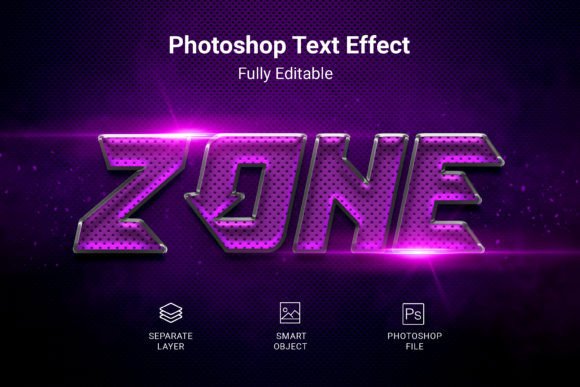
The Zone Psd Text Style Effect Mockup is a layered Photoshop file designed to apply a predefined text style to any text, shape, or vector logo. Instead of manually configuring layer styles, gradients, shadows, or textures, you drop your content into a smart object, save the change, and the effect applies automatically. This approach saves time and ensures consistency across multiple design elements.
The file comes with a resolution of 3000 × 2000 pixels at 300 DPI, which makes it suitable for both screen-based presentations and print-ready deliverables. The RGB color mode aligns with standard digital workflows, and the PSD format guarantees compatibility with Adobe Photoshop. A free font is included, so you do not need to purchase additional typefaces to achieve the intended look.
Key Characteristics and Technical Specifications
Understanding the technical foundation of this mockup helps clarify where it fits in a production environment. The key specifications include:
- File format: PSD, fully compatible with Adobe Photoshop
- Dimensions: 3000 × 2000 pixels, offering ample canvas for headlines and logos
- Resolution: 300 DPI, meeting print industry standards
- Color mode: RGB, optimized for digital display but convertible for print
- Editable elements: Smart object layers allow non-destructive editing
- Font requirement: Free font included, no additional purchase necessary
The smart object workflow is central to the mockup structure. You open the smart object layer, paste your text or logo, save, and the parent file updates automatically. This method preserves the original effect settings and prevents accidental modification of the style layers.
Strengths in Real-World Use
When evaluating any design resource, the critical measure is how it performs under actual working conditions. The Zone Psd Text Style Effect Mockup holds up well in several respects.
Speed and Efficiency
The most obvious benefit is time saved. Setting up a layered text effect manually can take anywhere from ten minutes to an hour depending on complexity. With this mockup, the same result appears in seconds. For designers juggling multiple revisions or tight deadlines, that efficiency matters. You can produce consistent headers, badges, or logo treatments without repeating tedious layer work.
Consistency Across Deliverables
When a project requires multiple text elements using the same effect, manual replication introduces variation. Shadows may shift slightly. Gradient angles may drift. With the smart object approach, every instance uses identical settings. This consistency is especially valuable for branding work where small visual discrepancies undermine professionalism.
Print-Ready Resolution
The 300 DPI resolution means the output is not limited to web use. Print materials such as business cards, flyers, posters, and merchandise mockups benefit from this level of detail. The 3000 × 2000 pixel canvas accommodates large headlines and central design elements without pixelation.
Flexibility with Shapes and Logos
While text effects often focus exclusively on type, this mockup extends its utility to vector shapes and logos. If you have a logotype or a geometric mark, you can apply the same treatment. This broadens the resource beyond simple headlines into territory typically reserved for custom layer styling.
Usability and Learning Curve
Designers familiar with Photoshop and smart objects will find the workflow intuitive. The steps are straightforward: locate the smart object layer, double-click to open it, replace the placeholder content with your own, save, and return to the main file. No scripting, no complex adjustments, no hidden steps.
For those newer to Photoshop, the process remains accessible. The mockup includes clear file structure, and the smart object method is forgiving. If you make a mistake, you can reopen the smart object and correct it without harming the surrounding file. This non-destructive workflow reduces risk for less experienced users.
One practical note: ensure your text or logo fits within the smart object boundaries. Content that extends beyond the canvas area may clip or appear incomplete. Scaling your content to match the placeholder dimensions avoids this issue.
Who Benefits Most from This Resource
The Zone Psd Text Style Effect Mockup suits a range of professionals, but certain roles and scenarios derive greater value from it.
Freelance Designers and Small Agencies
Freelancers often work alone and must manage every aspect of production. A resource that reduces repetitive tasks allows more time for strategy, client communication, and creative exploration. Small agencies with tight turnaround times also benefit from the speed and consistency this mockup provides.
Marketers and Social Media Managers
Professionals who produce visual content for campaigns, ads, or social media need rapid turnaround. Creating polished text effects for every post or banner is impractical. With this mockup, you can generate professional typography quickly while maintaining brand consistency across channels.
Entrepreneurs and Small Business Owners
Not every business owner has design expertise or a dedicated creative team. The Zone Psd Text Style Effect Mockup lowers the barrier to producing professional-looking materials. You can create your own headers, product labels, or promotional graphics without hiring a designer for every small task.
Educators and Content Creators
Teachers preparing course materials, presenters building slide decks, and YouTube creators designing thumbnails all benefit from fast, reliable text styling. The mockup saves effort on repeated design elements and maintains a cohesive visual identity across materials.
Practical Examples of Use
Consider a freelance designer working on branding for a coffee roaster. The project requires a logo mockup, a label design, and a social media header. Using the Zone Psd Text Style Effect Mockup, the designer applies the same text style to the brand name across all three deliverables. The consistent treatment reinforces brand recognition and reduces production time from hours to minutes.
A social media manager preparing a campaign for a product launch can create multiple versions of the headline using different copy. Each version retains the same visual style, so the campaign feels cohesive even as messaging changes. The manager can focus on copywriting and scheduling rather than rebuilding effects.
A small business owner launching a new service can produce a simple promotional graphic using their logo and a headline. Without formal design training, they achieve a result that looks deliberate and professional. This self-sufficiency saves money and speeds up time to market.
Quality and Long-Term Value
The quality of any PSD effect depends on the craftsmanship of the original file. The Zone Psd Text Style Effect Mockup presents a clean, well-organized layer structure. Effects are applied to adjustment layers and smart objects rather than rasterized flat images, which preserves editability indefinitely. As long as you work within Photoshop, the file remains functional for future projects.
The free font included with the mockup is a practical addition. It ensures you can achieve the intended look immediately without searching for compatible typefaces. However, you are not locked into that font. You can substitute any typeface that fits your brand or project requirements. The effect adapts to the new font while retaining the visual style.
One area where limitations may appear is in extreme customization. Because the effect is predefined, major alterations to the style itself—changing the shadow direction, adjusting gradient colors extensively, or swapping texture overlays—require manual intervention. The mockup is designed for applying, not for deconstructing. If you need a completely different visual treatment, you may be better served by building your own layer style from scratch. For most use cases, however, the provided style is sufficiently versatile.
How It Compares to Building Effects Manually
Building a text effect from scratch offers total control. You choose every parameter, every blending mode, every contour. The trade-off is time and reproducibility. Manual effects are harder to replicate exactly across multiple files unless you save your own style presets.
The Zone Psd Text Style Effect Mockup occupies a middle ground. It trades some customization freedom for speed and consistency. For professionals who produce similar work repeatedly, that trade-off is favorable. For projects requiring unique effects tailored to a specific brief, manual construction may be the better route.
The smart object workflow also makes versioning easier. If you produce multiple iterations of a design for client review, you can update text quickly and export revised mockups without rebuilding the effect. This capability is especially useful during revision cycles when clients request small copy changes.
Final Observations on Practical Fit
The Zone Psd Text Style Effect Mockup serves a clear purpose: it delivers a polished text effect quickly and reliably. It does not pretend to replace custom design work, nor does it claim to be a universal solution. Instead, it solves a specific problem—repetitive text styling—with a well-executed technical approach.
Designers who value efficiency, consistency, and professional output will find this resource a practical addition to their toolkit. Marketers, entrepreneurs, and content creators who lack dedicated design support will appreciate the simplicity and the quality of the result. The 300 DPI resolution ensures that output is suitable for both digital and print contexts, and the smart object workflow keeps the file maintainable over time.
If your work involves applying the same high-quality text style to multiple elements, this mockup saves meaningful time and reduces the risk of inconsistency. For those who need full creative freedom over every detail of the effect, the manual route remains appropriate. Understanding which camp you fall into determines whether this resource becomes a staple or a occasional utility.
The Zone Psd Text Style Effect Mockup delivers on its promise: a speedy, effortless way to apply a professional style to your text, shapes, and logos. For working professionals who value their time and their output, that combination is worth considering.