Golden Psd Text Style Effect Mockup: A Practical Tool for Designers, Marketers, and Creatives
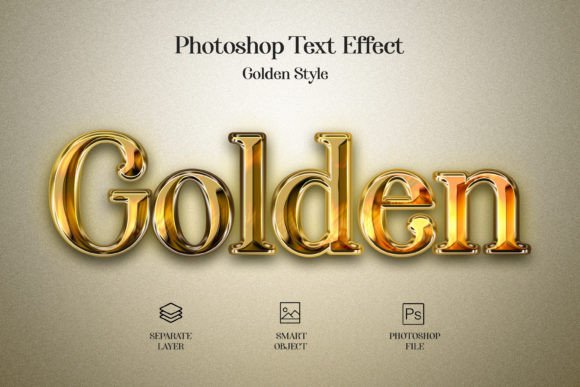
There is something about gold that immediately signals quality, luxury, and attention to detail. Whether you are designing a logo for a high-end brand, crafting social media graphics for a product launch, or putting together a presentation that needs to impress, the visual weight of gold text can elevate your work in seconds. That is exactly where the Golden Psd Text Style Effect Mockup comes into play. It is a ready-to-use PSD file that lets you apply a polished, realistic gold finish to any text, shape, or vector logo without spending hours building the effect from scratch.
If you have ever tried to create a metallic gold text effect manually in Photoshop, you already know how tedious it can be. Layer styles, gradients, noise, highlights, shadows, and color balancing all need to come together just right. One wrong adjustment and the result looks flat or plasticky. This mockup removes that guesswork entirely. You simply drop your content into a smart object, save it, and the effect is applied instantly. It is fast, it is consistent, and it looks professional.
What Makes the Golden Psd Text Style Effect Mockup Stand Out
Before diving into specific use cases, it is worth understanding what this file actually gives you. The PSD comes in a generous 3000×2000 pixel canvas with 300 DPI resolution, which means you can use it for both digital and print applications without worrying about pixelation. The color mode is RGB, so it works seamlessly for screen-based projects, but the resolution is high enough that you can repurpose it for print materials like flyers, business cards, or banners as well.
The file is fully editable. You are not stuck with a flattened image. Every element is organized in layers, and the smart object workflow is straightforward. You double-click the smart object thumbnail, paste your text or shape, save, and the golden effect is applied automatically. This also means you can reuse the same file multiple times for different projects, which is a huge time-saver if you work on branding or content creation regularly.
The font used in the preview is free, so you can match the exact look if you like it, or you can choose any other font that suits your brand identity. The flexibility is there.
Real-World Scenarios Where This Effect Shines
The real value of a tool like this becomes clear when you imagine the actual situations where you would reach for it. Here are several scenarios where the Golden Psd Text Style Effect Mockup can make a tangible difference in your workflow and final output.
Branding and Logo Presentations
Imagine you are a freelance graphic designer pitching a logo concept to a client in the luxury sector, maybe a jewelry brand, a premium skincare line, or a high-end real estate agency. You have designed a clean, minimal wordmark in black and white, which is great for structure, but the client wants to see how it looks with a metallic finish. Instead of rebuilding the effect from scratch or sending them a static JPEG that they cannot adjust, you use the golden PSD mockup. You drop their logo into the smart object, and within seconds, you have a realistic gold version that you can present alongside the original. The client can see exactly how the logo will behave in a premium context. That kind of flexibility often seals the deal faster than a flat mockup ever could.
Social Media Graphics and Digital Content
Social media managers and content creators are always under pressure to produce visually stunning assets quickly. If you run a page focused on luxury lifestyle, fashion, or motivational quotes, gold text can give your posts a cohesive, upscale feel. Instead of creating a new design for every post, you can keep the golden effect as a recurring element. You type your quote, apply it through the smart object, and export. The 3000×2000 pixel canvas gives you plenty of room to crop or resize for different platforms, whether it is Instagram stories, LinkedIn banners, or Pinterest pins. The effect becomes part of your visual signature, and your audience starts associating that gold finish with your brand.
Product Labels and Packaging Mockups
If you sell physical products, especially in categories where appearance matters a lot, such as candles, perfumes, cosmetics, or gourmet food, the gold text effect can be used to create realistic label mockups. You do not need to print a single label to see how the product will look on a shelf. You design the text or logo inside the PSD, place it on a bottle or box mockup, and you have a presentation-ready visual for your website, your Kickstarter campaign, or your pitch deck. This saves you money on test prints and helps you iterate faster on your packaging design.
Event Invitations and Certificates
Weddings, galas, award ceremonies, and milestone celebrations often call for elegant typography. Gold text on a dark background, for example, is a classic combination that feels timeless. If you are designing digital invitations or printable certificates for an event, the golden PSD effect gives you a consistent, high-quality look without needing advanced Photoshop skills. You can create a set of matching assets, from the main invitation to the thank-you cards and placeholders, all using the same gold finish. The result is a cohesive visual identity that impresses guests or recipients.
YouTube Thumbnails and Channel Art
Content creators on YouTube know that thumbnails are often the difference between a click and a scroll. If your channel covers topics like luxury travel, fine dining, or personal development, gold text in your thumbnails can signal high production value. You can use the mockup to create bold, readable titles that pop against almost any background. Because the file is fully editable, you can tweak the text for each video while keeping the same golden style, building brand recognition with every upload.
How Different Users Benefit from the Same Tool
One of the strengths of the Golden Psd Text Style Effect Mockup is that it adapts to different skill levels and workflows. A professional graphic designer might use it as a starting point and then layer additional effects on top, such as a subtle drop shadow or a background texture. A beginner, on the other hand, can use it right out of the box without any prior knowledge of layer styles or blending modes. The smart object workflow is forgiving. If you make a mistake, you simply go back into the smart object, correct the text, and save again. There is no need to redo the entire effect.
For marketing teams working under tight deadlines, this mockup is a reliable asset that ensures consistency. If three different people on your team need to create graphics for the same campaign, they can all use the same PSD file and produce results that look like they came from the same designer. That kind of consistency is hard to achieve when everyone builds their own effects from scratch.
For small business owners who handle their own marketing, this tool removes the need to hire a designer for every single graphic. You can create professional-looking materials for your website, social media, and email campaigns without learning advanced Photoshop techniques. The time saved can be redirected toward other parts of your business.
Common Considerations Before Using the Mockup
While the Golden Psd Text Style Effect Mockup is easy to use, there are a few things worth keeping in mind to get the best results. First, the effect looks best on bold or thick fonts. Thin, delicate typefaces may not capture the metallic reflection as well because there is less surface area for the gradients and highlights to work with. If you are using a light font, you might want to increase the stroke weight or choose a different typeface altogether.
Second, the background you place behind the gold text matters. The effect is designed to look realistic, but it relies on contrast. A mid-tone or dark background usually makes the gold pop the most, while a very busy or brightly colored background can compete with the metallic finish. Plain black, deep navy, dark green, or rich burgundy are safe choices that complement the gold without overwhelming it.
Third, consider the context of your project. Gold text conveys luxury, celebration, and premium quality. That might not be the right tone for every brand or every message. If your brand voice is casual, minimal, or industrial, a gold effect could feel out of place. Think about whether the visual aligns with the emotional tone you want to communicate.
Also, while the file is high resolution and print-ready, it is still a digital effect. If you are producing large-format prints, such as banners or signage, you may want to test a small section first to see how the gold effect holds up at scale. In most cases, the 300 DPI resolution is more than sufficient, but it is always a good idea to do a test print when the final output matters.
Strengths and Practical Limitations
The biggest strength of this mockup is the balance between quality and speed. You get a realistic gold finish without spending an hour building and tweaking layer styles. The smart object workflow is intuitive, and the high resolution ensures that your output looks sharp whether you are publishing online or sending to print.
Another strength is the file size and dimensions. At 3000×2000 pixels, you have enough canvas to work with wide text, multiple lines, or even small vector graphics. You are not forced to cram your content into a tiny space. And because it is fully editable, you can customize not just the text but also the background or add additional elements without breaking the effect.
A potential limitation is that the effect is a specific style. If you need a brushed metal finish, a rose gold tone, or a textured gold look, you might need to adjust the layer styles manually or look for a different mockup. This particular file delivers a clean, polished gold finish, which is versatile, but it is not a one-size-fits-all solution for every metallic effect you might ever need.
Also, while the smart object method is simple, it does require Photoshop. If you are using other design software like Affinity Designer or Canva, you cannot directly use the PSD smart object workflow. You could still open the file in Photoshop, apply your text, and then export the result as a PNG or JPEG to use elsewhere, but that adds an extra step.
Final Thoughts on Using the Golden Psd Text Style Effect Mockup
Tools like this exist to make your creative process smoother, not to replace your judgment. The Golden Psd Text Style Effect Mockup gives you a reliable, high-quality gold finish that you can apply in seconds, but it is up to you to choose when and where to use it. Think about the message you want to send, the audience you are speaking to, and the medium you are working with. When used thoughtfully, this effect can add a layer of polish that makes your work stand out in a crowded visual landscape.
Whether you are designing a logo for a client, creating content for your own brand, or preparing materials for a special event, having a fast, high-quality gold text effect in your toolkit frees you up to focus on the bigger picture. And that is exactly what a good design resource should do.