3D Racer PSD Text Style Effect Mockup: A Practical Review for Designers
When you need to add speed, motion, and dimension to typography, few tools deliver as efficiently as a dedicated text style mockup. The 3D Racer PSD Text Style Effect Mockup is one such resource that promises high-quality results with minimal effort. But like any design asset, it has strengths, limitations, and specific use cases where it truly shines. Whether you are a graphic designer, a marketing professional, or a hobbyist exploring text effects, understanding what this PSD offers—and where it might fall short—will help you decide if it fits your workflow.
What Makes the 3D Racer PSD Text Style Effect Mockup Distinct?
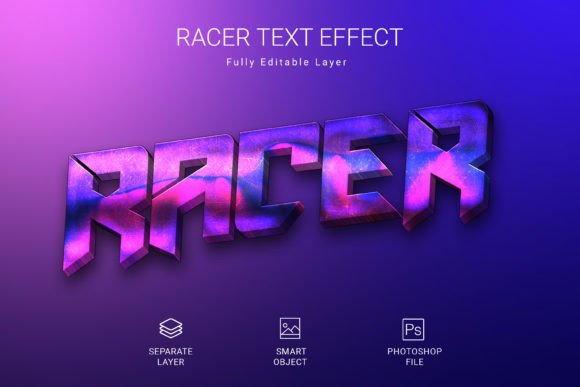
At its core, this mockup is a pre-built Photoshop file that applies a racing-inspired 3D style to text, shapes, or vector logos. The key differentiator is how it simplifies a normally complex process. Creating a convincing 3D racer effect from scratch involves lighting, beveling, extrusion, texture mapping, and shadow work. This PSD package condenses that entire pipeline into a smart object workflow. You open the file, double-click the smart object layer, paste your text or logo, save, and the effect renders automatically.
The file is built at 3000×2000 pixels with 300 DPI resolution, which means it supports high-quality print output as well as digital use. The RGB color mode ensures compatibility with screen-based projects, while the generous canvas size gives you room to position your text without crowding. All layers remain editable, so you can tweak colors, shadows, and highlights even after applying your content.
Another distinctive feature is its use of a free font. This removes the common friction of having to purchase a separate typeface to match the style. You can download the font at no cost, apply it, and immediately see the intended aesthetic. For designers who value speed and consistency, this integration is a practical advantage.
How It Compares with Other Text Effect Approaches
To evaluate the 3D Racer PSD Text Style Effect Mockup fairly, it helps to consider the broader landscape of text styling options. Broadly, designers choose among three routes: manual 3D text creation in 3D software, custom layer styles in Photoshop, and pre-built PSD mockups like this one.
Manual 3D Software vs. PSD Mockup
Programs like Blender, Cinema 4D, or even Photoshop’s native 3D tools give you full control over geometry, lighting, and materials. You can build a truly unique racer effect from the ground up. However, this comes at a steep learning curve and significant time investment. For a one-off project or when you need absolute originality, manual creation is hard to beat. But for recurring use, tight deadlines, or when you need consistency across multiple assets, a mockup is far more efficient. The 3D Racer PSD file trades total creative freedom for speed and repeatability—a tradeoff many working designers happily accept.
Custom Layer Styles vs. Pre-Built Mockup
Many designers rely on saved layer style presets (such as .asl files) to apply effects quickly. While these are fast, they rarely achieve the depth and realism of a well-constructed PSD mockup. Layer styles operate within a single layer’s boundaries, whereas this PSD uses multiple adjustment layers, gradient fills, brushwork, and masking to create a physically convincing 3D appearance. The result is richer, with true extrusion depth and surface reflections that a simple layer style cannot replicate. The tradeoff is file size and complexity: the PSD is larger and requires Photoshop to edit, while a layer style works across any text layer in any document.
Other PSD Text Effect Mockups
Within the category of PSD text effect mockups, the 3D Racer style occupies a specific niche focused on speed and motion aesthetics. Other mockups might offer metallic, neon, vintage, or holographic effects. The racer style is distinguished by dynamic angles, sharp edges, and a sense of forward movement. If your project demands a sporty, energetic, or automotive-inspired look, this mockup is more aligned than a general-purpose 3D effect. But if you need a subtle, elegant, or minimalist treatment, other mockups or custom approaches would serve you better.
Strengths and Practical Tradeoffs
To use the 3D Racer PSD Text Style Effect Mockup effectively, you need to understand both its capabilities and its constraints.
Strengths
- Speed of execution: The smart object workflow reduces a potentially hours-long process to minutes. This is invaluable when producing multiple variations or working under client deadlines.
- Consistent quality: Because the effect is pre-built with professionally tuned settings, you avoid guesswork. The output is reliably high-resolution and print-ready.
- Editable flexibility: Despite being a template, the PSD retains full editability. You can adjust colors, contrast, shadow intensity, and even the underlying layer masks to better fit your specific text or logo.
- Vector and shape support: The effect works not only on text but on vector shapes and logos, extending its utility beyond typography to brand elements and icons.
Tradeoffs and Limitations
- Fixed perspective and lighting: The 3D effect is baked into the composition’s lighting setup. If your text or logo has an unusual orientation, the illusion may break. You cannot rotate the 3D object freely without significant manual adjustments.
- Dependence on Photoshop: This asset is tied to Adobe Photoshop. Users of other software like Affinity Photo, GIMP, or Canva cannot leverage the smart object workflow directly. Some layers may translate, but the full effect requires the native PSD environment.
- Font dependency: While the recommended font is free, substituting a different typeface may alter the appearance. Condensed or heavily styled fonts might not read as clearly with the 3D extrusion, so testing is advisable.
- Style specificity: The racer aesthetic is bold and distinctive. It suits sports branding, automotive content, gaming graphics, and energetic marketing materials. It would feel out of place in corporate reports, academic presentations, or luxury branding.
Best-Fit Use Cases
The 3D Racer PSD Text Style Effect Mockup is an excellent choice when your project demands a high-impact, motion-oriented look and you lack the time or expertise to build it from scratch. Consider using it for:
- Social media headers and cover images for automotive, motorsport, or fitness brands.
- YouTube thumbnails or channel art where speed and energy are central themes.
- Event posters for races, car shows, or gaming tournaments.
- Product badges and labels that need a competitive, sporty edge.
- Logo mockups for startup brands in the automotive or performance industries.
It also works well for repeated use across a campaign. Because you can swap text or logos quickly, you can maintain visual consistency across multiple assets without rebuilding the effect each time.
When You Might Need a Different Solution
No single tool works for every scenario. You may want to look elsewhere if:
- You need full 3D rotation: If your project requires viewing the text from multiple angles or integrating it into a 3D scene, a dedicated 3D application or a fully parametric mockup is necessary.
- Your brand aesthetic is subtle or conservative: The racer style is loud by design. For minimalist or professional contexts, a simpler text treatment would be more appropriate.
- You work outside the Adobe ecosystem: Without Photoshop, the smart object functionality is inaccessible. You could attempt to recreate the effect manually, but the convenience is lost.
- You need extreme customization: While the PSD is editable, fundamental aspects like the extrusion angle or the light source position are fixed. If your creative vision requires redoing these elements, you may be better off building your own effect.
Decision Factors to Consider Before Buying
When evaluating whether the 3D Racer PSD Text Style Effect Mockup is right for you, weigh the following:
- Your typical output medium: If you primarily design for print at large sizes, the 300 DPI and 3000×2000 pixel canvas are well-suited. For web-only use, the resolution is more than adequate but also means larger file sizes.
- Frequency of need: If you create racer-style text effects only once or twice a year, investing in a mockup may be less economical than outsourcing or creating a quick layer style. If you use it monthly, the time savings add up quickly.
- Client or project variety: If your work spans many different aesthetics, a single-purpose mockup might sit unused. If you have a niche in sporty or automotive design, it becomes a staple.
- Your comfort with Photoshop: The smart object workflow is beginner-friendly, but some familiarity with layers, masks, and adjustment layers helps you customize effectively. Complete novices may still get good results by simply replacing the placeholder text.
A Realistic Look at the Workflow
Imagine you are designing a hero banner for a new electric scooter brand. The client wants the word "Volt" to look fast, modern, and three-dimensional. Using the 3D Racer PSD Text Style Effect Mockup, you open the file, double-click the smart object layer, type "Volt" using the recommended free font, save, and return to the main composition. The effect applies instantly. You then adjust the background color to match the brand palette and fine-tune the highlights using the provided adjustment layers. Total time: under 10 minutes. The same project in 3D software would take at least an hour, and the client likely could not tell the difference in final quality.
Compare this to a scenario where you need to place the word "Volt" on a curved surface in a 3D environment. The mockup cannot accommodate that geometry. You would need a full 3D workflow or a different type of mockup that supports surface mapping. Understanding this boundary is essential to choosing the right tool.
Final Thoughts on Choosing the Right Text Effect
The 3D Racer PSD Text Style Effect Mockup offers a genuine shortcut to professional-looking 3D typography for a specific, energetic style. It excels where speed, consistency, and high resolution matter more than total creative freedom. For designers who regularly produce sporty or automotive-inspired content, it is a practical addition to the toolkit. For those whose work demands more subtlety or full 3D control, alternative methods will serve better.
Evaluate your own project needs honestly. Consider the tradeoff between time saved and flexibility lost. And remember that no single resource covers every situation—the best designers build a library of tools and know when to use each one. If the racer aesthetic aligns with your current work, this PSD mockup can help you deliver polished results without unnecessary complexity.
Ultimately, the value of any design asset comes down to how well it fits your specific workflow and the expectations of your audience. When used in the right context, the 3D Racer PSD Text Style Effect Mockup is a reliable, time-saving solution that lets you focus on the creative parts of your project instead of the technical grind.