Glazing Psd Text Style Effect Mockup
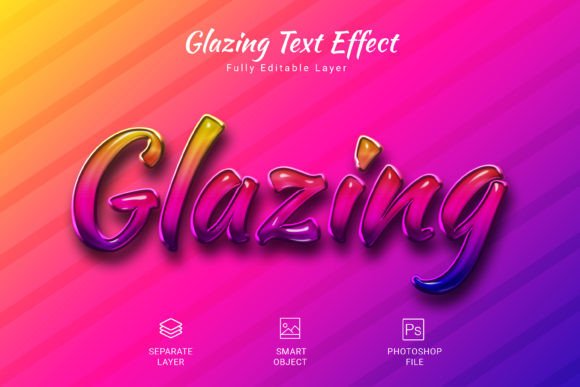
Designing polished text effects can sometimes feel like a challenge, especially when you want something that looks both professional and distinctive without spending hours on manual adjustments. That is exactly where the Glazing Psd Text Style Effect Mockup steps in. This ready-to-use PSD file gives you a quick and reliable way to apply a high-quality glazed texture to your words, shapes, or vector logos. Instead of building every layer from the ground up, you simply insert your content into a smart object, hit save, and the effect applies instantly. Whether you are working on a social media graphic, a brand logo, or a personal project, this effect helps you achieve a clean, glossy finish that catches the eye.
What the Glazing Effect Offers in Practical Terms
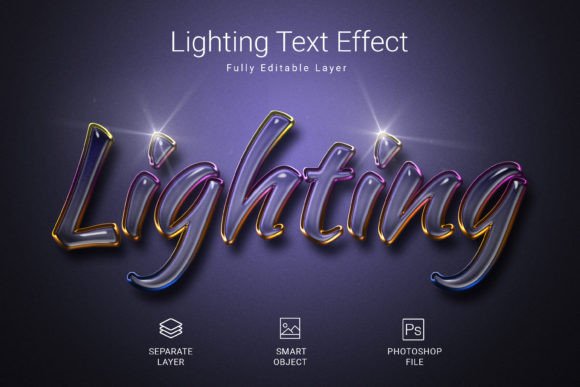
At its core, this text style effect mockup is a pre-built Photoshop file that simulates a transparent, glass-like surface over your text or design elements. The glazing look adds depth, reflection, and a subtle sense of luminosity that makes flat text feel more dimensional. Because the file comes fully layered and editable, you have control over how the glaze interacts with your background, colors, and overall composition.
The mockup arrives in a 3000×2000 pixel canvas at 300 DPI, which means the output remains crisp whether you use it for digital screens or print materials. The RGB color mode ensures that colors stay vibrant on monitors, tablets, and phones, while the high resolution gives you the flexibility to scale the design for posters, banners, or packaging mockups without losing detail.
Key Characteristics That Make It Stand Out
- High-quality PSD format – The file is built with care, using clean layers and organized groups so you can easily locate and adjust elements.
- Fully editable – Every aspect of the effect, from the glaze opacity to the highlight intensity, can be modified to fit your vision.
- Smart object workflow – You place your text, shape, or logo into a smart object, save the changes, and the mockup updates automatically. This eliminates the need for complex layer masking or manual blending.
- Free font included – The design uses a freely available typeface, so you do not need to purchase additional fonts to recreate the look shown in the preview.
- Speedy application – Once you understand the smart object process, applying the glazing effect takes only a few seconds. This makes it ideal for batch projects or tight deadlines.
Why Someone Might Choose This Text Effect
Many designers, hobbyists, and small business owners look for text effects that save time without compromising on quality. The Glazing Psd Text Style Effect Mockup addresses several common needs:
- Speed – Instead of building a glass reflection from scratch, you get a ready-made solution that works in moments.
- Consistency – When you need to apply the same glossy look across multiple assets, the smart object workflow ensures every item matches perfectly.
- Simplicity – Even if you are not an advanced Photoshop user, the clear file structure and straightforward instructions make the process accessible.
- Versatility – Because the effect works on text, shapes, and vector logos, you can use it for a wide range of projects, from YouTube thumbnails to product labels.
For beginners, the main appeal is the low learning curve. You do not need to understand layer styles, blending modes, or reflection mapping to get a professional result. More experienced creators appreciate the customizability and the fact that the effect can be layered with other adjustments to create unique variations.
Social Media Graphics and Digital Content
If you manage social media accounts for a brand or create content as a freelancer, you know that standout text can make a post more engaging. Adding a glazing effect to headlines, quotes, or call-to-action text gives it a polished, modern feel that stands out in a crowded feed. The 300 DPI resolution also means the graphic will look sharp even when viewed on larger screens or projectors.
Logo and Brand Identity Work
Small business owners and entrepreneurs often need a logo that looks premium without hiring a high-end agency. With this mockup, you can test how your wordmark or icon-based logo would appear with a glossy finish. The effect works naturally with vector logos because the smart object preserves the original shapes and curves, so you are not forced to simplify your design to accommodate the texture.
Print and Packaging Mockups
For product packaging, stickers, or labels, a glazed text effect can simulate a shiny laminate or UV coating. If you are designing a product concept for a client or preparing a pitch, the mockup helps you visualize how the final printed piece might look. The RGB color mode is standard for digital previews, but you can convert the file to CMYK later if needed for commercial printing.
Educational Materials and Presentations
Teachers, educators, and course creators often use text effects to make slides, handouts, or online course graphics more visually appealing. A glazed title can draw attention to key concepts without being distracting. Because the effect is subtle and clean, it adds a touch of professionalism to educational content without overwhelming the message.
Personal Projects and Hobbies
Hobbyists working on invitations, greeting cards, digital art, or personal branding projects can also benefit. The mockup gives you an easy way to experiment with a glass-like finish on your name, event details, or decorative text. The fact that it includes a free font reduces the need to search for complementary typefaces, so you can focus on the creative part.
Important Considerations Before Using the Mockup
While the Glazing Psd Text Style Effect Mockup is designed to be user-friendly, a few points are worth keeping in mind to get the best results.
Compatibility and Software Requirements
This file is in PSD format, which means you need Adobe Photoshop or a compatible application that supports PSD layers and smart objects. If you use a different image editor, double-check that it can handle smart objects, as that is the core mechanism for applying your text. Most modern versions of Photoshop from CS6 onward work well with this file.
Background Considerations
The glazing effect interacts with whatever background sits behind your text. For the glaze to show clearly, choose a background that contrasts well with your text color. Darker backgrounds tend to make the glass reflection pop more, but lighter backgrounds can also work if the text itself is bold. Experimenting with a few color combinations helps you find the look that fits your project.
Font Choices and Legibility
Because the glaze adds a reflective layer, very thin or overly ornate fonts may lose some readability. Thicker, bolder typefaces usually hold the effect better and keep the text easy to read. The free font included in the file is a good starting point, but you can use any font you prefer as long as it suits the glazed finish.
Layer Organization and Edits
If you plan to make advanced modifications, take a moment to explore the layer structure. The file groups the effect layers separately from the background, so you can adjust the glaze intensity, reflection angle, or color overlay without affecting other parts of the design. Making a backup copy of the original PSD is always a good habit before diving into heavy edits.
Output Format for Different Uses
Depending on your final use, you may need to save the completed design in a different format. For digital use, saving as PNG or JPEG works well. For print, consider converting the file to CMYK and saving as TIFF or PDF. The 300 DPI resolution already meets standard print requirements, so scaling down for screen use is straightforward.
How to Get Started with the Glazing Effect
Using the mockup is straightforward. After opening the PSD file in Photoshop, locate the smart object layer that contains the placeholder text. Double-click its thumbnail to open it in a new window, paste your own text, shape, or vector logo into that document, and save the changes. When you return to the main file, the glazing effect applies to your content automatically. From there, you can fine-tune the color, position, and scale as needed.
If you are new to smart objects, do not worry. The process is essentially the same as editing a linked file inside Photoshop, and the mockup typically includes a short instruction layer or text note to guide you. Once you have done it once, you will find it easy to repeat for future projects.
Final Thoughts on the Value of This Mockup
The Glazing Psd Text Style Effect Mockup is a practical tool for anyone who wants to add a polished, glass-like finish to their text or logos without investing hours in manual design work. Its high resolution, editable layers, and smart object workflow make it suitable for a wide range of users, from casual creators to seasoned professionals. Whether you are preparing content for social media, branding materials, packaging mockups, or educational slides, this effect provides a reliable way to elevate your visual presentation.
If you decide to give it a try, remember to explore different background colors, font weights, and glaze settings to make the effect your own. And if the result meets your expectations, leaving a 5-star rating is a simple way to acknowledge the effort behind the file and help others discover a useful resource for their own projects.