Silver Psd Text Style Effect Mockup
Finding the right text treatment can make or break a design. You might have the perfect layout, the ideal imagery, and a solid color palette, but if your headline or logo text looks flat, the whole piece loses impact. That is where a specialized resource like the Silver Psd Text Style Effect Mockup becomes genuinely useful. It offers a direct path to a polished, metallic finish without requiring you to build complex layer styles from scratch. Instead of spending hours tweaking gradients, bevels, and shadows, you simply drop your text or shape into a smart object, and the effect applies itself cleanly and consistently.
For anyone working in graphic design, content creation, or brand management, this type of mockup serves as both a timesaver and a quality booster. The silver aesthetic carries a sense of sophistication, premium value, and clarity. Whether you are producing social media visuals, product packaging mockups, presentation titles, or vector logos, having a reliable silver text effect in your toolkit means you can deliver a polished result quickly. Let’s walk through what this PSD mockup includes, where it shines, and how you can get the most out of it in your own work.
What the Silver Text Effect Mockup Offers
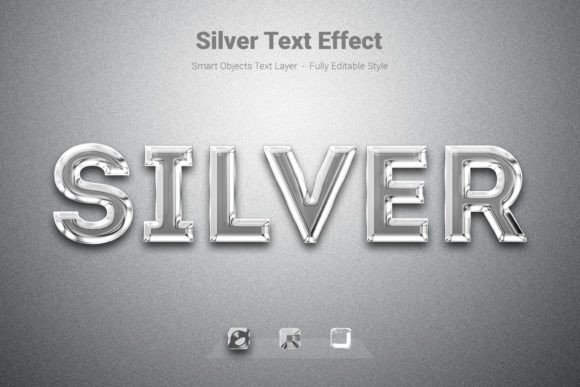
This PSD file is built around simplicity and high output quality. It provides a silver metallic style that you can apply to text, simple shapes, or vector logos. The mechanism is straightforward: the file uses smart objects, so you only need to double-click the smart object layer, paste in your content, save, and the effect renders automatically. There is no need to adjust layer styles manually each time.
Key specifications of the file include:
- High-quality PSD file with a clean, organized layer structure
- Canvas size of 3000×2000 pixels, giving you plenty of room for headlines, logos, or compositions
- PSD file format compatible with Adobe Photoshop
- RGB color mode, suitable for digital screens, web use, and social media
- 300 DPI resolution, which also supports high-quality print output if needed
- Fully editable text and smart objects, so you retain control over your content
- Free font used, meaning you can replicate the exact look shown in the preview without additional licensing costs
These specs matter because they ensure the final result looks crisp on retina displays and holds up when printed. The 3000×2000 pixel canvas is particularly generous for a text effect mockup. It allows you to center a large wordmark or compose multiple lines of text without feeling cramped. And because the file is fully editable, you can tweak the background, adjust the lighting overlay, or even combine the silver effect with other design elements.
Real-World Applications Across Different Fields
One of the strengths of this Silver Psd Text Style Effect Mockup is how broadly it applies. It is not locked into one type of project. Here are several scenarios where it can add real value.
Brand identity and logo design
When you are developing a brand identity for a client, presentation matters. A silver text treatment can suggest luxury, technology, or timelessness. You might use the mockup to present logo concepts in a realistic context, showing the client how their wordmark would look on a sleek silver backdrop or as part of a product label. Because the effect applies to vector shapes as well as text, you can even test it on emblem elements or abstract marks.
Social media and digital content
Content creators and social media managers often need eye-catching headlines that stand out in a crowded feed. A silver metallic title can differentiate your post from standard flat text. You could use the mockup for YouTube thumbnail titles, Instagram story highlights, LinkedIn banner text, or webinar promotional graphics. The reflective, metallic finish naturally draws the eye, which helps improve click-through rates.
Product packaging and mockups
If you design product packaging, the silver text effect can simulate foil stamping or metallic printing. You can place product names, ingredient lists, or brand slogans onto package mockups and get a realistic representation of how the final physical product will look. This saves time and money compared to producing physical prototypes for every iteration.
Presentations and internal communications
Professionals in corporate environments, education, and training can use the mockup to elevate presentation titles, section headers, or quote slides. A silver accent in an otherwise muted deck adds a sense of formality and polish. It signals attention to detail without being overly flashy.
Freelance and client work
Freelancers often juggle multiple projects with tight deadlines. Having a reliable preset like this one means you can deliver a high-end look quickly. Whether you are designing a logo, a flyer, or a digital ad, you can drop the text into the smart object and move on to the next task. It reduces the repetitive work of building effects from scratch while maintaining a professional standard.
Usability and Efficiency Benefits
The main appeal of a PSD mockup like this is the balance between quality and speed. You get a result that looks like it took careful manual construction, but the actual effort is minimal. The smart object workflow is intuitive even for those who are not Photoshop experts. If you can open a file, double-click a layer, and save, you can use this effect.
Another practical benefit is consistency. When you manually create a silver text effect, subtle differences in gradient angles, shadow distances, or highlight brightness can creep in between projects. This mockup locks those variables in place, so every piece of text you produce matches exactly. That is valuable for brand guidelines where the metallic look must remain uniform across all touchpoints.
The 300 DPI resolution and RGB color mode also give you flexibility. You can use the output for digital screens immediately, and if a client later requests a print version, the resolution already supports it. You are not locked into one medium.
What to Consider When Using the Mockup
While the Silver Psd Text Style Effect Mockup is straightforward to use, a few practical considerations will help you get the best results.
Font choice matters. The mockup uses a free font, but you can substitute any typeface. However, the silver effect interacts with the shape of the letters. Thick, bold fonts tend to show off the metallic gradients and highlights more clearly. Thin or delicate fonts may lose detail or look washed out. Test a few options to see what works best for your specific message.
Background contrast. Silver text pops best against darker or neutral backgrounds. A dark gray, navy, or black background will make the metallic reflections stand out. Against a white or very light background, the silver can feel flat. Consider placing a dark background layer behind your text within the PSD file, or choose a complementary background color when compositing your final design.
Lighting and shadow consistency. The mockup already includes built-in lighting and shadow effects. If you place the text into a composition that has a completely different light source direction, the illusion may break. For best results, use the mockup as a standalone element or adjust the lighting overlay in the PSD to match your scene. The file is fully editable, so you can tweak the layer styles if needed.
Output format. Since the file is in RGB color mode, it is ideal for screen use. If you need CMYK for commercial print, you can convert the final output, but be aware that some of the metallic brightness may shift in the conversion. Test a small print sample if color accuracy is critical.
Practical Recommendations for Getting Started
If you are new to using PSD mockups, the workflow is simple. Open the file in Photoshop, locate the smart object layer (usually labeled clearly), double-click its thumbnail to open a new window. Paste or type your text, scale it to fit, and then save and close that window. The main file will update automatically with your text rendered in the silver style.
For vector logos or shapes, the same process applies. Place your vector artwork into the smart object, and the effect will wrap around it. This makes it easy to test different logo variations or to apply the silver look to an entire emblem.
Keep the original PSD file untouched as a master. When you need a new variation, duplicate the file and work from the copy. That way, you always have a clean base to return to.
Final Thoughts on Value and Versatility
The Silver Psd Text Style Effect Mockup is not just a fancy filter. It is a practical tool that reduces friction in your design workflow. It gives you a high-quality metallic finish without the steep learning curve of building custom layer styles. For designers, marketers, educators, and business owners who need reliable text effects on demand, it fits naturally into a productive workflow.
Whether you are crafting a brand identity, producing content for social media, designing packaging, or preparing a presentation, having this effect ready to go means you can spend less time on technical setup and more time on the creative decisions that actually move your project forward. That is the kind of resource that earns a permanent spot in your design toolkit.